Linux LVM - Logical Volume Manager
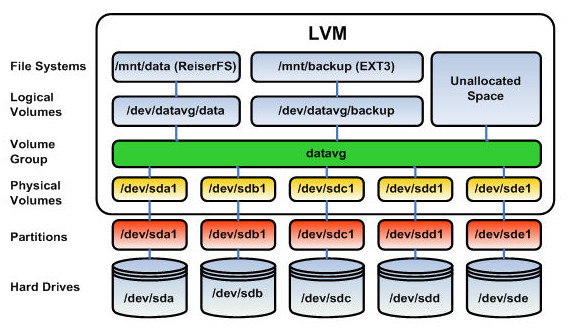
LVM, or Logical Volume Management, is a storage device management technology that gives users the power to pool and abstract the physical layout of component storage devices for flexible administration. Utilizing the device mapper Linux kernel framework, the current iteration, LVM2, can be used to gather existing storage devices into groups and allocate logical units from the combined space as needed.
Give me LVM terms need to know basically?
I'll explain the key LVM (Logical Volume Management) terms you need to know:
Physical Volume (PV): A disk or disk partition that's used by LVM. Before using any disk with LVM, you need to mark it as a physical volume using pvcreate.
Volume Group (VG): A collection of physical volumes that create a storage pool. Think of it as combining multiple physical disks into one large storage container.
Logical Volume (LV): A "virtual partition" created from the volume group. These are what you actually format with a filesystem and mount. They can span across multiple physical volumes and can be resized easily.
Extents: The basic building blocks of LVM. Both PVs and LVs are divided into these small fixed-size chunks (usually 4MB by default).
Common commands:
pvcreate: Initialize a PVvgcreate: Create a VGlvcreate: Create an LVlvextend: Increase LV sizelvreduce: Decrease LV sizepvdisplay/vgdisplay/lvdisplay: Show detailed information
Let me know if you'd like me to explain any of these concepts in more detail!
Basic commands for LVM usage, to manage PVs, VGs, LVs.
Here are the essential LVM commands for managing Physical Volumes (PV), Volume Groups (VG), and Logical Volumes (LV):
Physical Volume Commands:
pvcreate /dev/sdb                # Create a physical volume
pvs                             # List PVs with basic info
pvdisplay                       # Detailed PV information
pvremove /dev/sdb               # Remove a PV
Volume Group Commands:
vgcreate vg_name /dev/sdb       # Create VG from PV
vgs                             # List VGs with basic info
vgdisplay                       # Detailed VG information
vgextend vg_name /dev/sdc       # Add PV to existing VG
vgreduce vg_name /dev/sdc       # Remove PV from VG
vgremove vg_name                # Delete VG
Logical Volume Commands:
lvcreate -n lv_name -L 10G vg_name    # Create 10GB LV
lvs                                    # List LVs with basic info
lvdisplay                             # Detailed LV information
lvextend -L +5G /dev/vg_name/lv_name  # Add 5GB to LV
lvreduce -L -5G /dev/vg_name/lv_name  # Reduce LV by 5GB
lvremove /dev/vg_name/lv_name         # Delete LV
After size changes, don't forget:
resize2fs /dev/vg_name/lv_name # Resize filesystem after LV changes
Common options:
-L: Specify size in G (GB), M (MB), etc.-l: Specify size in extents-n: Specify name for new LV